Styles and levels
Build each style's level list (Beginners 1–3, Intermediate 1–3 or plain 1, 2, 3), choose where newcomers are welcome, and change a list that's already in use.
For owners and managers
Each style you teach has its own level list: the steps a dancer climbs, lowest first. Your Salsa list can be Beginners 1–3 then Intermediate 1–3, while your Bachata list is just Bachata 1, 2, 3.
Courses and open classes pick a step from this list. Fill-ins and catch-ups use the order of the list to decide which dancers match which classes.
Where: sidebar → Styles and levels. You can also open the same editor from the Level field of a course or open class: choose Set up … levels or Edit … levels at the bottom of the list.
Who: owners and managers.
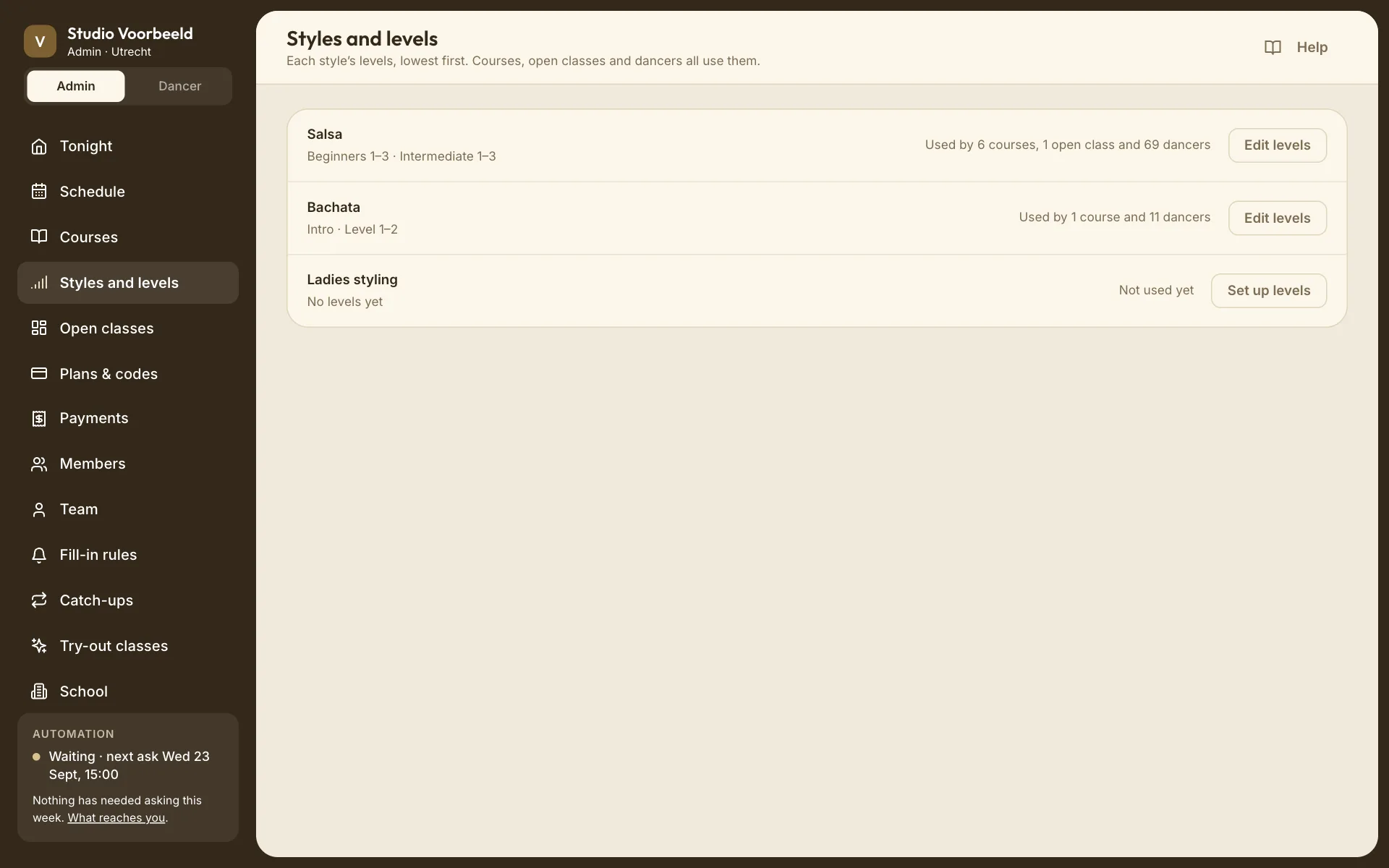
The overview#
One row per style you teach. Each row shows the style's levels (or No levels yet), what uses them (Used by …, or Not used yet), and a button: Set up levels or Edit levels.
A style appears here once you tick it under Styles you teach on the School page. Saving a level list for a style also counts as teaching it.
Groups and steps#
A list is made of groups. A group has a name and a number of steps:
| Group | Steps | Names dancers see |
|---|---|---|
| Beginners | 3 | Beginners 1, Beginners 2, Beginners 3 |
| Intermediate | 3 | Intermediate 1, Intermediate 2, Intermediate 3 |
Naming rules:
- One group without a name uses the style's name: Salsa 1, Salsa 2, Salsa 3. This is the quickest set-up for a small school, and it's what a new list starts as (one unnamed group of three).
- A group with a single step shows just its name, without a number: "Intro", not "Intro 1".
- With more than one group, every group needs a name, and no two groups can share a name. Names can be up to 40 characters.
In the editor:
- − and + change how many steps a group has, from 1 to 12.
- Add a group adds a new group at the end of the list, as the highest level. Move it down if it belongs lower.
- × removes a group. It only appears when there's more than one.
- The arrows move a group up or down the list.
A style can have 30 steps in total at most.
Order matters#
The list is lowest first, and the editor says so: "Lowest first. Dancers move up in this order." The steps are counted straight through, across groups. With Beginners 1–3 then Intermediate 1–3, Intermediate 1 is the fourth step. It sits directly above Beginners 3, and it isn't the same as Beginners 1.
That's what fill-ins and catch-ups use:
- A fill-in rule of One level above too can ask a Beginners 3 dancer to help in an Intermediate 1 class, because those steps are next to each other.
- A catch-up rule of One level either side can send someone from Beginners 3 to Intermediate 1.
Neither looks at group names. Only the position in the list counts.
A level list describes order. It doesn't make a dancer finish one level before booking the next, it doesn't move dancers up, and it doesn't create courses. Defining six levels gives you six steps to choose from; you still create each course yourself.
No experience needed up to#
Choose the highest step a complete beginner can join. Every step from the bottom up to that one counts as open to newcomers. The choice is always a run from the bottom: you can't mark Beginners 1 and Intermediate 1 as open to newcomers while leaving Beginners 2 closed.
- None of them means no step is marked as open to newcomers.
- A new list starts with the lowest step selected.
On course cards, a step in this range shows the badge No experience needed instead of the level name. A course set to Any level shows the same badge.
Any level#
In a course or open class, Any level means the class isn't tied to a step. A course set to it shows No experience needed on its card, as described above; an open class shows no level at all, and isn't listed as open to beginners. For catch-ups, a class with no level can match a dancer from any level; see Catch-ups.
Changing a list that's in use#
Courses, classes and dancers point at a step, not at a name or a position. That means:
- Renaming a group is safe. Everyone on "Beginner 2" is now on "Beginners 2".
- Reordering groups is safe for the records, but it changes which steps are next to each other, and so what fill-ins and catch-ups match.
- Adding steps or groups is safe for the records, and it also changes the distances between steps.
- Removing steps is the one change with consequences. If you lower a group's count or remove a group, the steps that disappear are listed with what's on them:
- Courses and classes on a removed step must move. Choose Move to … for each one; Save levels stays disabled until you do.
- Dancers on a removed step move with its courses and classes. Only a step that no course or class uses offers Leave those dancers unrated.
Shrinking a group always removes steps from its end. To turn "Salsa 1–6" into Beginners 1–3 and Intermediate 1–3, you rename the group Beginners and lower it to 3, which removes Salsa 4–6. Then you add Intermediate with 3 new steps and move what was on Salsa 4, 5 and 6 to Intermediate 1, 2 and 3. G02: Change an existing ladder walks through it.
At the bottom of the editor, In use by … tells you how much depends on this style's list.
"This changes who gets asked to fill in"#
If your school runs fill-ins and its rule looks at levels, the editor previews what your draft would do to fill-in reach before you save it. It lists each affected step with the number of dancers who could be asked before and after ("Beginners 3 · 14 dancers → 9"). The preview counts dancers who would be eligible under your saved fill-in rule. It isn't a prediction of who will say yes.
Where levels come from for dancers#
Dancers choose their own level for each style at your school, from your list, in their profile. Staff can see a dancer's level but can't set it. If you remove a step, the dancers on it either move with the choice you make above or become unrated. Unrated dancers can pick a level again themselves.
Saving#
Save levels saves the whole list and closes the editor ("Salsa levels saved."). Cancel discards the draft. When you opened the editor from a course or open class, that form keeps the step you'd chosen, even if the step was renamed or moved.
Related#
- G01: Beginners 1–3 and Intermediate 1–3
- G02: Change an existing ladder
- Fill-in rules and Catch-ups: the rules that use level order