Cancel one date
Call off one lesson. Who is told, who gets credits or money back, what happens to fill-ins, catch-ups and try-outs, and what it means for a course.
For owners and managers
Use this when one lesson won't happen: the teacher is ill, the building is closed, it's a public holiday. The rest of the course or open class carries on.
Where: open the lesson → Edit this date → Cancel this date, at the bottom of the dialog.
Who: owners and managers. A teacher who can't come tells the school; the school decides whether the class runs.
When: before it starts. A date that has started has happened, so it can't be cancelled: the dialog doesn't offer it.
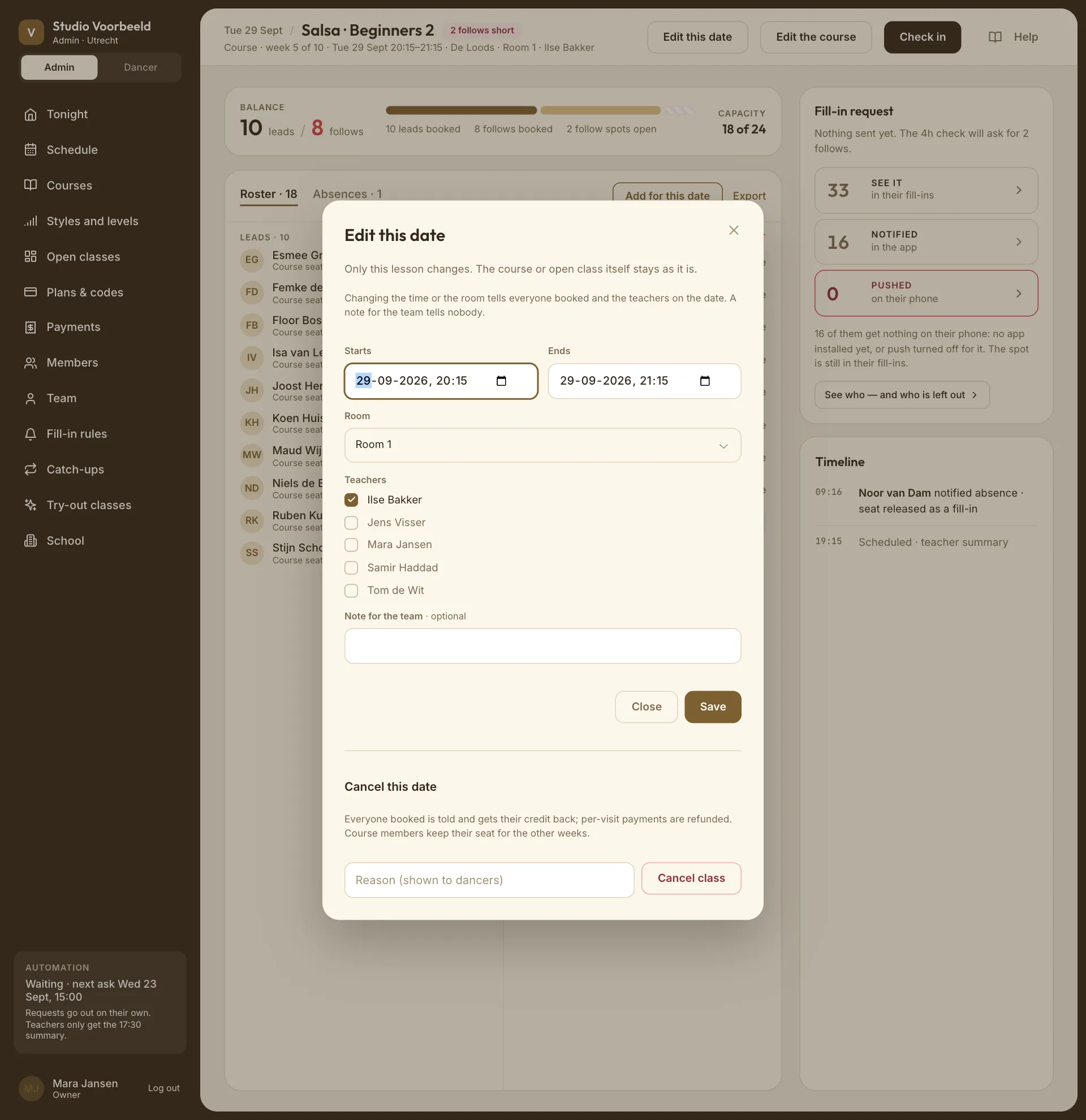
How to cancel#
- Open the lesson from Tonight or Schedule.
- Edit this date.
- Under Cancel this date, type a Reason (shown to dancers). For example: "Ilse is ill. Next week as usual."
- Cancel class. The app asks first, Cancel this date?, and says what it will undo: how many places are cancelled and how many course members miss the week.
- If people paid money for the date, a tick Refund the €… is on by default: the money goes back to their cards straight away. Untick it only if you'll sort it out another way; they're then told to get in touch about the payment.
- Cancel this date, Cancel it and refund €… or Cancel it without refunding. Keep it on backs out.
The app confirms how many dancers were told and how many payments were refunded: "Cancelled. 18 dancers were told, 2 payments refunded." If a refund didn't go through at Stripe, it says so: refund it from the dancer's page under Members.
There's no undo. A cancelled date stays cancelled.
What happens to each person#
| Who | What happens |
|---|---|
| Booked with credits | Told, and the credit comes back, whatever your cancellation window says. |
| Paid per class | Told, and refunded in full, unless you unticked Refund. |
| Paid try-out | Told, refunded unless you unticked Refund, and they can book another try-out. It doesn't count as the one they had. |
| Free class, fill-in, staff-added place | Told. Nothing to give back. |
| Catch-up booked into this date | Told. Their missed week can be caught up somewhere else while their window is open. |
| Course dancers | Told "Week 4 does not take place", or your reason. They keep their seat for the other weeks. |
| Course dancers who'd already said they can't come | Not told again. |
Your cancellation settings don't apply here. They're for dancers cancelling their own bookings; see Cancellations.
Any live fill-in request for the date is stopped.
Courses: the week isn't replaced#
Cancelling a course week doesn't:
- make the block longer, or add a replacement week;
- refund part of the block price;
- give dancers a catch-up for that week. Catch-ups are for weeks a dancer misses, not weeks the school cancels.
If you'll make it up (an extra week at the end, a free open class), say so in the reason, and set it up yourself. For a public holiday you know about in advance, cancel that week before the block starts selling, so dancers can see it.
If a refund didn't go through#
Refunds go back through Stripe, from your school's own account. If the message doesn't mention payments refunded when someone paid, check Payments under Refunded. See Refund or credit didn't arrive.
Cancelling versus ending#
To stop an open class for good, don't cancel its dates one by one: End class removes or cancels every future date at once. See Stop or extend a recurring class.