Event editor
Every setting for a party, practica or social night — capacity, how long it runs, per-event price or free, early-bird and door prices, tickets for people who don't dance with you, refunds, and ending one.
For owners and managers
An event is an evening people come to rather than a class they are taught: a party, a practica, a social, a festival night. Dansly sells it by the ticket, and it can be open to people who don't dance at your school.
Where: sidebar → Classes & events → New open class, then set Kind of evening to Event. To change an existing one, open it from Classes & events.
Who: owners and managers.
For a walk-through from start to finish, see G17: Sell tickets to a party.
What choosing Event changes#
Kind of evening has three choices: Class, Workshop and Event. ("Social" was a fourth until September 2026; every social is now an event.)
Choosing Event takes away what only a class needs:
| Gone for an event | Why |
|---|---|
| Style and Level | Nobody is placed on a level list for a party. They are cleared when you save. |
| Teachers | Nobody teaches it. Dansly shows "floor time only". |
| Leads and follows | Everyone is counted together, nobody picks a role, and there are no fill-in requests. |
| Credits | An event is sold per ticket or free. Credit plans are for classes. |
| Try-out class | A try-out is somebody's first class; an event is never one. |
It is still an open class in every other way: it has a room, a date or a repeating run, and its own page for each evening.
The event#
| Field | What to put |
|---|---|
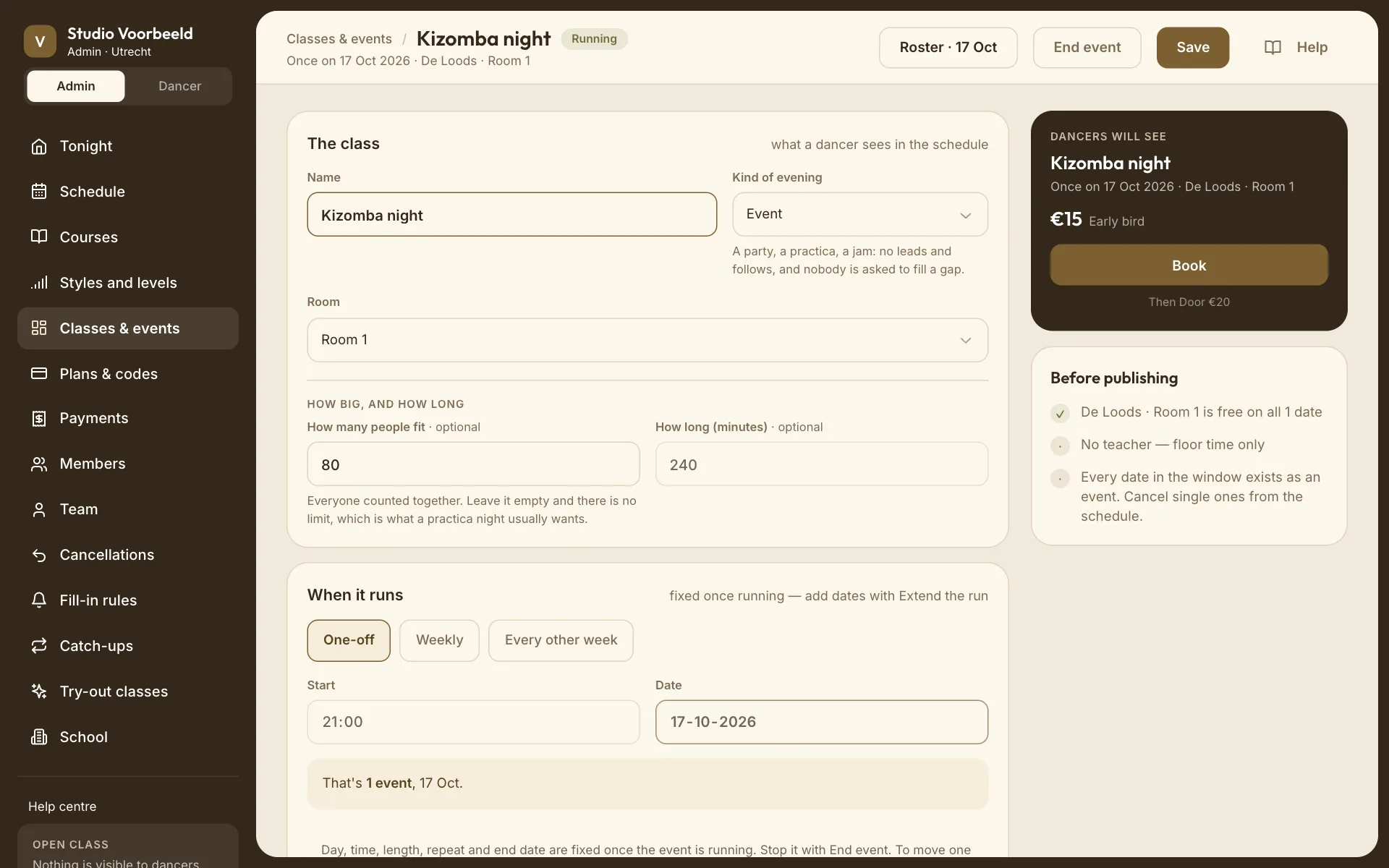
| Name | What people see, for example "Kizomba night". |
| Room | Where it happens. Pick a room in the right building. |
| How many people fit · optional | Everyone together, the whole room. Empty means no limit, which suits a practica. When it's full, buyers see Sold out. |
| How long (minutes) · optional | Up to 5 hours. Empty means four hours. It only decides when the evening comes off the calendar. |
When it runs#
One-off for a single night: a Start time and a Date. Weekly and Every other week work as they do for classes; see Open-class editor.
The line underneath counts what you'll get: "That's 1 event, 17 Oct."
Once the event is running, its date, time, length and repeat are fixed. To move one evening, change that date from the schedule; see Change one date.
How it's paid for#
| Choice | Meaning |
|---|---|
| Per event | A ticket at a price you set. |
| Free | Nothing to pay. Good for practicas and open floors. |
With Per event, fill in Price (€), or build a price that changes (below).
Does the price change?#
| Choice | The price |
|---|---|
| One price | The price above, for everyone. |
| By date | Cheaper the further ahead people buy: an early bird. |
| By tickets sold | Cheaper for the first tickets, dearer once they've gone. |
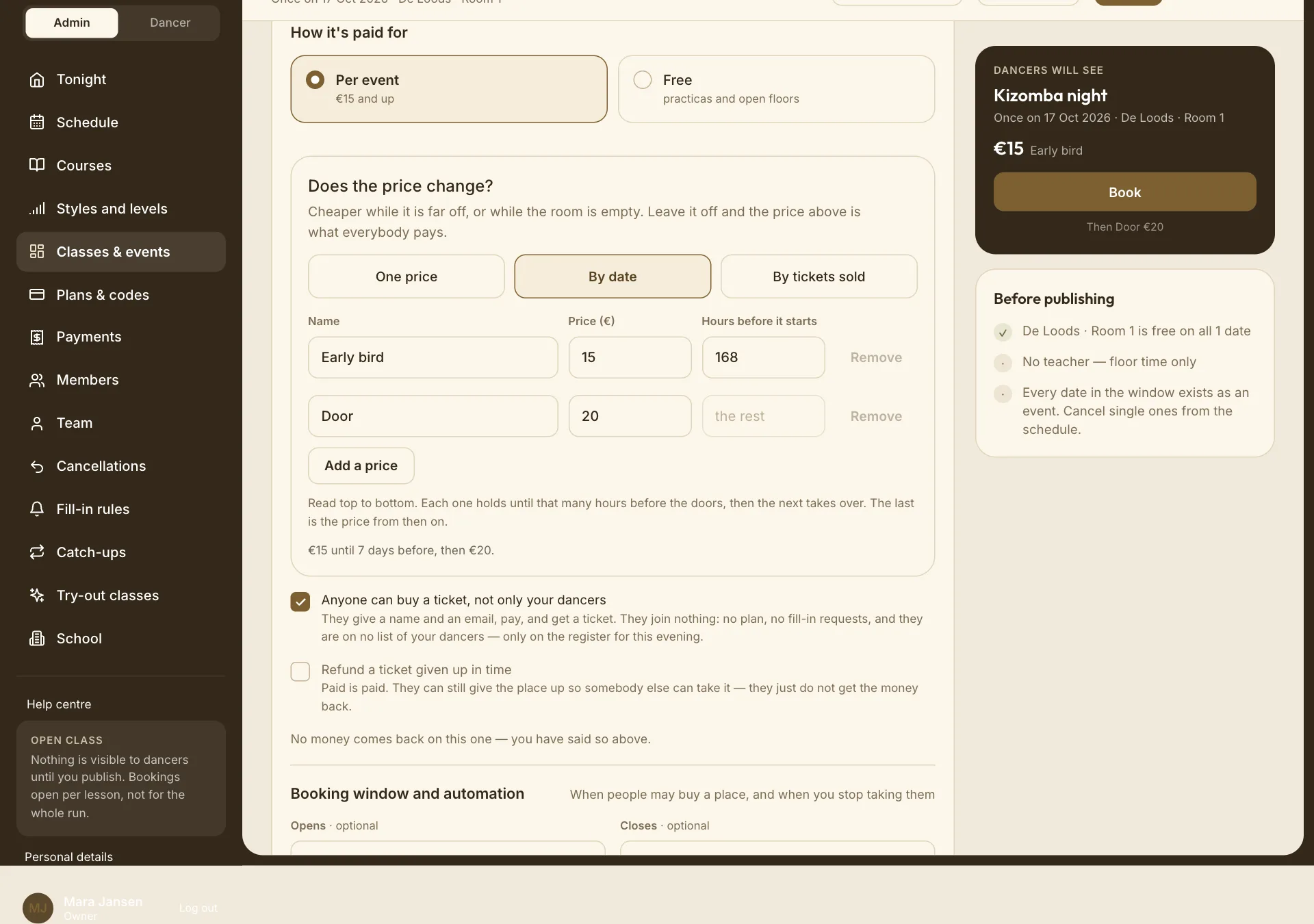
With By date or By tickets sold you write a short list of prices, read from top to bottom. Each row has a Name, a Price (€) and one number:
- By date: Hours before it starts, the moment this price stops. 168 is a week.
- By tickets sold: Tickets at this price, how many are sold at it, counting from the first ticket.
The last row has no number: it is the price for everything after. Use Add a price for a third step, and Remove to drop one.
The form writes the list out as a sentence so you can check it, for example "€15 until 7 days before, then €20." or "The first 30 tickets at €15, then €20." Check that sentence after switching between the two modes: the numbers stay in the boxes, so 168 hours becomes 168 tickets.
Every row but the last needs its number. Leave one empty and the form refuses to save ("Say when Early bird hands over…"), because that price would never end. You need at least two rows; with one, choose One price instead.
What buyers see and pay:
- The price running today, with the next ones listed underneath ("Then Door €20"). At checkout they see every step, with the ones that have gone struck through and marked sold out.
- With By tickets sold, how many are left at the current price.
- A buyer can pick a later, dearer price on purpose, for example to buy five together when only two are left at the early price. They can never pick a price that has gone.
- One order is always at one price.
Anyone can buy a ticket, not only your dancers#
Off by default: only people who have joined your school can buy, and anyone else has to make a full Dansly account first.
When it's on, anyone can buy with their name, email and birthdate. "They join nothing: no plan, no fill-in requests, and they are on no list of your dancers — only on the register for this evening." They get their ticket by email and on a ticket page, and can keep the account afterwards if they want to.
Refund a ticket given up in time#
Off by default for events: "Paid is paid." A buyer can still give their place up so someone else can have it, but gets no money back.
When it's on, someone who gives their ticket up at least as early as your class cancellation window gets the money back. The window is set once under Cancellations.
This is the event's own answer. The school-wide Refund a cancelled single visit doesn't apply to events.
Booking window#
| Field | Meaning |
|---|---|
| Opens · optional | How many days before the event tickets go on sale. Empty means on sale as soon as it is published, which is what you want for a party announced months ahead. |
| Closes · optional | How many minutes before the start sales stop. Empty or 0 means right up to the start. |
Tickets#
- One buyer can buy up to 10 tickets in one order. They get one code per ticket, shown on one page they swipe through.
- A discount code works on the whole order, once. Codes for Single visits apply to events.
- Giving up tickets is all of the order or none of it.
- Everyone gets their tickets by email as well as in the app, because a ticket is something you carry to the door.
Letting people in#
Every evening sold per ticket has a Door screen for scanning tickets. See Let people in at the door.
Ending an event#
End event asks first, and says exactly what it will undo:
- how many dates still to come come off the schedule;
- how many places on how many dates are cancelled (everyone holding one is told);
- if people paid, a tick Refund the €…, on by default. With it on, the money goes back to the cards it came from straight away. With it off, "The money stays with you. Everybody is told to get in touch about it."
Choose Keep it running to back out. The button then reads End the event, End it and refund €… or End it without refunding. Past dates stay, and Run again can start it again later.
To call off just one evening of a repeating event, cancel that date instead; see Cancel one date.