Fill-in rules
How Dansly asks dancers to fill a class that's short on leads or follows, covering who may fill in, when the check runs, how big the gap must be, and which levels are asked.
For owners and managers
A fill-in is a dancer who helps out in a class that's short on one role, like two follows short for Tuesday's Beginners 2. Filling in is free for the dancer. These rules decide when Dansly asks, and whom. They apply to the whole school; teachers never send requests themselves.
Where: sidebar → Fill-in rules.
Who: owners and managers. Changes wait for Save changes ("Rules saved.").
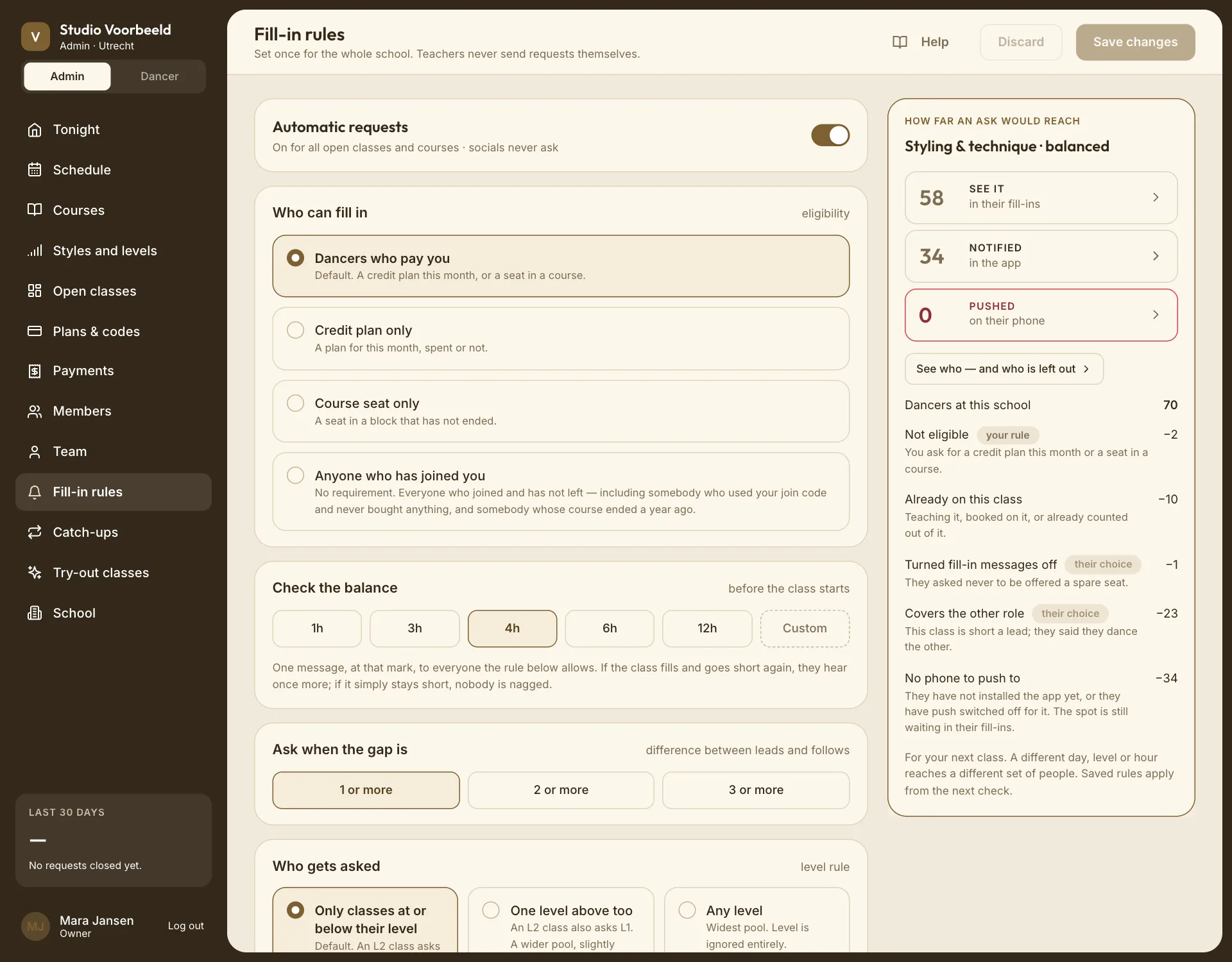
Automatic requests#
The main switch.
- On: "On for all open classes and courses · events never ask."
- Off: nothing is sent. Dancers don't see a Fill-ins tab for your school at all.
A course or open class can opt out on its own editor (Ask dancers when a week here is short on a course, Off for this class on an open class). Nothing asks while this main switch is off, and a class that opted out never asks.
Fill-ins only apply to partner classes: events and solo courses never ask.
Who can fill in#
Who you're willing to give a free place to.
| Choice | Who |
|---|---|
| Dancers who pay you (default) | A credit plan this month, or a seat in a course. |
| Credit plan only | A plan for this month, spent or not. |
| Course seat only | A seat in a block that hasn't ended. |
| Anyone who has joined you | No requirement. Everyone who joined and hasn't left, including someone who used your join code and never bought anything, and someone whose course ended a year ago. |
Check the balance#
When, before the class starts, Dansly looks at the balance: 1h, 3h, 4h (default), 6h, 12h, or Custom (1–72 hours).
From that moment until the class starts, Dansly checks every few minutes. The first time the class is short by at least the gap below, one message goes out to everyone the rules allow. It doesn't matter whether the class was short at the mark or became short later, when someone cancelled.
- If the class stays short, nobody is asked again. There are no reminders and no second, wider round.
- If it fills and then goes short again, a new request goes out.
- If a walk-in or a booking closes the gap, the request closes, and anyone still holding an unanswered invitation is told they're no longer needed.
Someone marked absent in advance. When a teacher or manager marks a dancer absent before the class starts, and that leaves the class short, Dansly asks straight away rather than waiting for the check mark. The switches still apply: a class or school with fill-ins off doesn't ask.
Ask when the gap is#
The difference between leads and follows that triggers a request: 1 or more (default), 2 or more or 3 or more.
This is about balance, not empty places. A class with 6 leads and 6 follows in a room for 24 is balanced, and nobody is asked. A class with 10 leads and 8 follows is 2 follows short, so fill-ins are asked for 2 follows.
Who gets asked (levels)#
Which dancers match a class's level. Levels are counted by their position in your level list, across group names.
| Choice | A Beginners 2 class asks |
|---|---|
| Only classes at or below their level (default) | Dancers on Beginners 2 and higher. |
| One level above too | Also Beginners 1: a wider pool, slightly mixed. |
| Any level | Everyone, whatever their level. |
Across groups it works the same way. With Beginners 1–3 then Intermediate 1–3, One level above too lets an Intermediate 1 class ask Beginners 3 dancers.
Who is asked, and who is told#
Everyone who fits is asked at the same moment. Several filters decide who fits, in this order:
- Eligible under Who can fill in.
- Level within Who gets asked.
- Free: not already in this class, and not booked into another class at that time.
Everyone who passes those three can see the spot on their Fill-ins board and dashboard. Of those, Dansly notifies only people who:
- haven't turned fill-in messages off;
- cover the missing role;
- said they're usually free that day;
- haven't muted your school.
A phone push also needs notifications allowed on their phone.
The first three are yours to change. The last four are the dancer's own preferences; you can see them, but not change them. So "could see it", "was told" and "got a phone buzz" are three different numbers. A dancer who turned messages off can still find the spot and take it.
The first dancer to claim a spot gets it. The request asks for exactly the number missing, and it closes once that's filled.
How far an ask would reach#
The card on the right uses your saved rules and your next class on the schedule to show how many dancers an ask would reach, and which rule narrows it most. Open it for the full list per dancer, with the reason each person was or wasn't asked. It doesn't preview unsaved changes on this page, and a different day, level or time reaches different people.
The same breakdown is on every lesson; see Why wasn't this dancer asked?
On a lesson: Stop asking, Start asking again#
Stopping or resuming happens on the class, not here. A manager can choose Stop asking on a live request. Dancers who already claimed a place keep it, and the others' invitations are quietly withdrawn. Start asking again (before the class starts) brings the same invitations back, and nobody is messaged a second time. A request a manager stopped stays stopped, even if the class goes short again. See G04: Automatic fill-ins.
Related#
- G04: Automatic fill-ins
- Styles and levels: how level order affects matching
- Notification settings: what staff hear about fill-ins