Change one date
Move one lesson to another time or room, put a stand-in teacher on it, or leave a note for the team, without touching the rest of the course or open class.
For owners, managers and teachers
Use this when one evening is different: the class starts later, moves to Room 2, or has a stand-in teacher. The course or open class itself, and every other date, stays as it is.
Where: open the lesson from Tonight or Schedule → Edit this date.
Who: owners and managers, and the teacher of that class. Only owners and managers can change who teaches it.
What you can change#
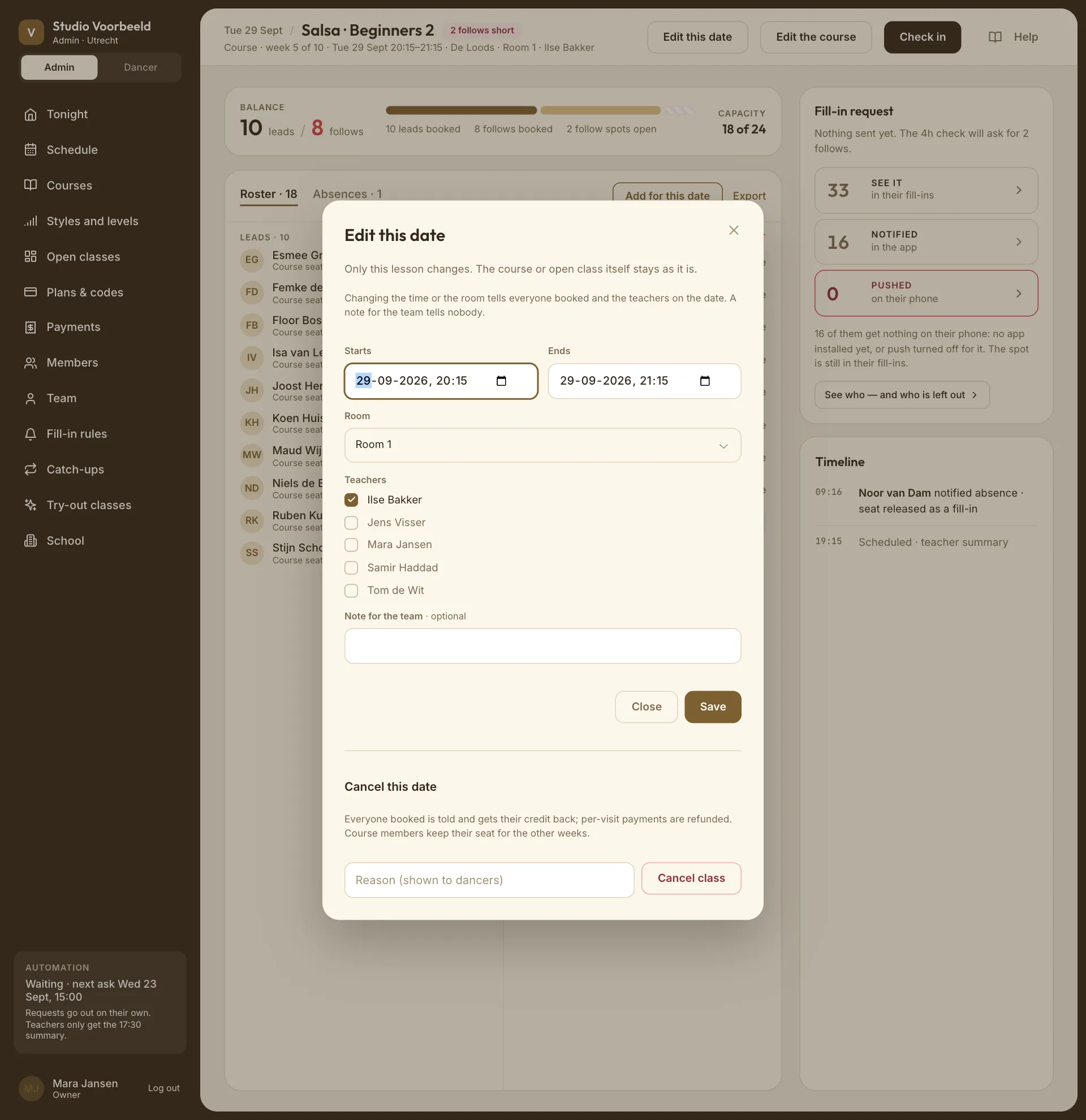
The dialog is called Edit this date. "Only this lesson changes. The course or open class itself stays as it is."
| Field | Notes |
|---|---|
| Starts / Ends | Date and time. It has to end after it starts. You can move it to another day. |
| Room | Any room in any of your buildings. You can also add a room from here. |
| Teachers | Owners and managers only. Tick who teaches this date. |
| Note for the team | Optional. Only your team sees it. |
Choose Save. The app confirms "Lesson updated."
Who gets told#
- A new time or room: everyone booked or enrolled for that date, and the teachers on it, get a notice, for example "Salsa · Beginners 2 moved: Now Thu 09 Oct 20:30, was 20:15". A move to another building names the building.
- A note for the team: tells nobody. It's shown on the lesson.
- A different teacher: a teacher you add gets a notice that they're teaching that date. A teacher you take off isn't told, so tell them yourself.
You don't get a notice for your own change. Changes to a date that has already happened are recorded in the class's history but sent to nobody.
A stand-in teacher#
On Tuesday 14 October, Ilse is away and Samir takes Salsa · Beginners 2:
- Open that Tuesday's lesson → Edit this date.
- Under Teachers, untick Ilse and tick Samir.
- Save.
That date now shows in Samir's Tonight and My classes, with its register, and not in Ilse's. The other weeks are unchanged.
The stand-in stays on that date when you later edit the course, including when you add or remove a teacher on the course itself.
Changing the date versus changing the class#
| You want to | Do this |
|---|---|
| Move one evening | Edit this date, here. |
| Change the room or teacher for every coming date | Edit the course or open class. It changes all future dates, including ones you moved here. |
| Change the day or time of every date | Not possible on a running class. See Changed a class but this date didn't move. |
| Call one evening off | Cancel one date. |
Edit the course or Edit the open class, beside Edit this date, takes owners and managers to the class itself.
Changing the room on the whole course or open class tells everyone booked on a date still to come, and a course's members, with the old and the new room. Their place is kept.